Weft FAQ
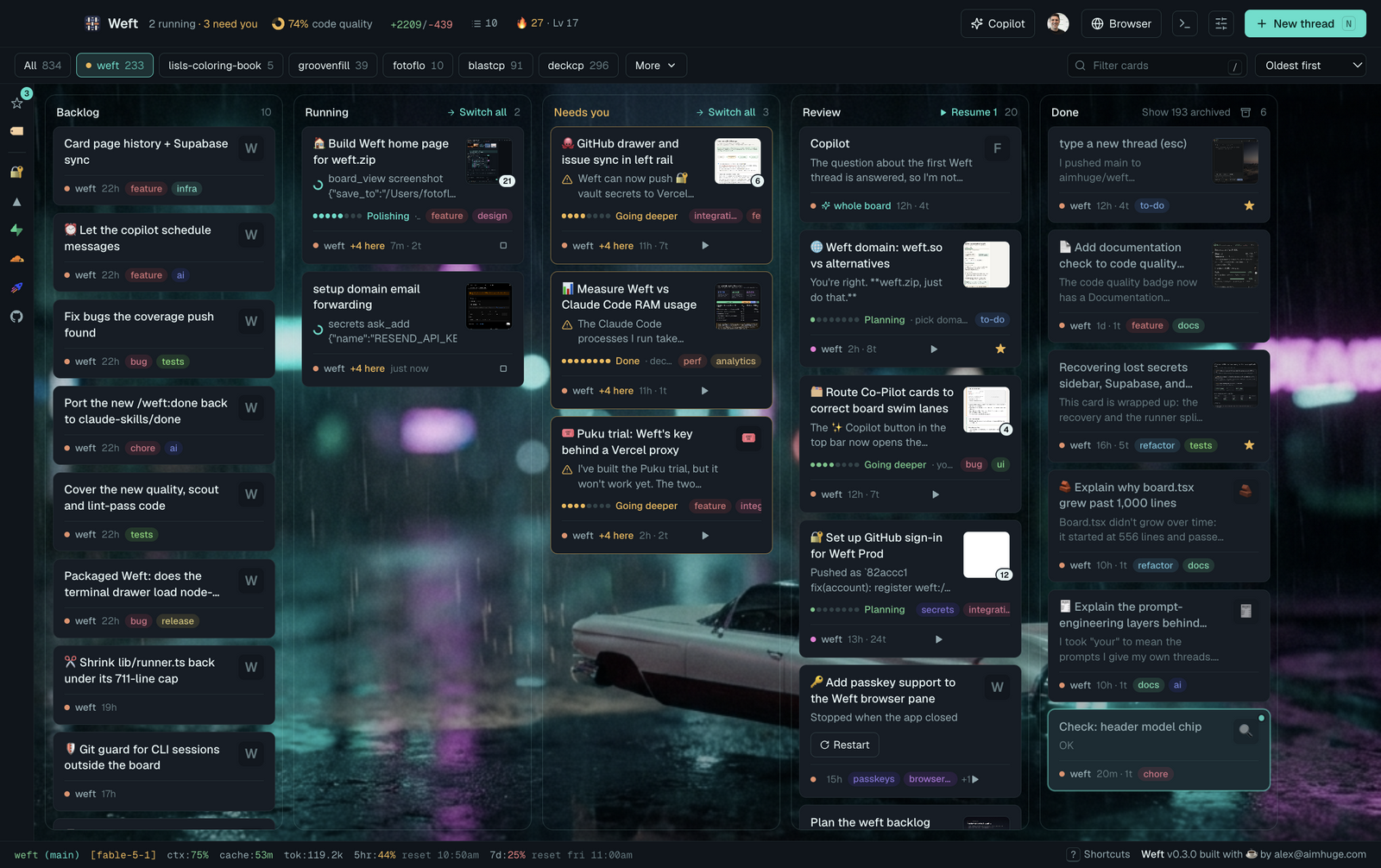
Everything people ask about Weft, from "what is it?" to "why is there a hovercar behind my board?". For the full feature tour read README.md; for how a piece works inside, the matching doc in docs/architecture/.
- The basics
- Installing and running
- Cards and the board
- CLIs, models and permissions
- Working in a thread
- The browser pane
- Running many threads at once
- Guardrails: what threads can't do
- The secrets vault
- Connectors: GitHub, Vercel, Supabase, Cloudflare, BlastCP
- Dev servers, services, webhooks and the terminal
- The copilot
- Code quality, committing and planning
- Streaks, badges and leagues
- Accounts, teams and weft.zip
- Pricing and billing
- Privacy and your data
- Troubleshooting
- Contributing, license and what's next
The basics
What is Weft?
A desktop kanban board for AI coding agents. Every card is a live Claude Code or puku-cli thread (Codex works too), working in one of your project folders. Beside the board sits a real browser pane that you and the threads share, and a copilot that can read and run the board for you. You say what you want; threads plan it, build it, show it to you in the pane and walk you through the review.
Who is it for?
Builders and product managers who run more than one agent at a time. If you've ever had five terminal tabs of Claude Code going and lost track of which one was waiting on you, Weft is that, organised: the columns tell you what's running, what needs you and what's ready to review.
Why is it called Weft?
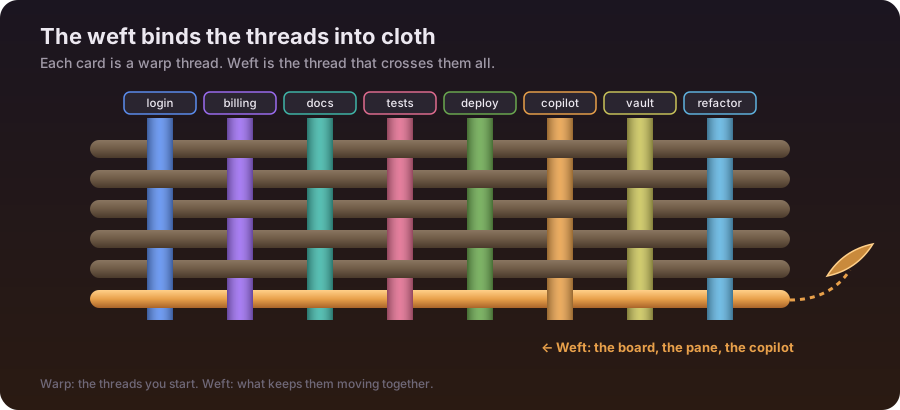
On a loom, the warp threads run lengthwise and the weft is the thread that crosses them, over and under, binding them into cloth. On the board, every card is a warp thread, and Weft is the thread across them: the board, the pane and the copilot that turn a pile of separate agent threads into finished work. The same picture runs all the way through: the levels go Thread, Strand, Yarn, Bolt, Loom and Tapestry, your progress dialog is your Wefter Profile, and your activity shows up as woven stitches.
What's with the cars anyway?


We liked the picture of a copilot riding next to you behind the wheel of the engineering marvels of the future, so we played with it to make wefting more fun. You drive; the copilot sits beside you in a flight helmet. The car turns up all over: the start screen, the scenes behind the board (Twin Suns, Canyon, Coast Road, Neon City, Snow Pass, Salt Flats), the "working…" page in a card's pane while its first turn runs, and the cockpit behind the open copilot chat.
Is it a replacement for Claude Code?
No. Weft runs the real CLIs (Claude Code, puku-cli, Codex) underneath, with your own logins, settings, MCP servers,
plugins, skills and CLAUDE.md. It adds the board, the browser pane, the copilot, the vault and guardrails on top.
Anything you can do in a Claude Code terminal session you can do in a card.
How is it different from just opening several terminals?
From the advent of Claude Code, we could open three, four, five, even six terminals at a time and watch a bunch of threads very closely, but it was a real strain. Then, about six months ago, it seemed like AI stopped producing bugs, and I didn't have to watch it as closely anymore. Now I trust the CLIs a lot more, and with Weft I let them run a lot more cards with a lot less mental overload. I've also noticed my cards are much shorter, which I believe has saved me a lot of tokens.
— Alex Miller, founder of Weft
What that looks like day to day:
- One look tells you where everything is. Every thread sits in Running, Needs you, Review or Done, with its stage and what's left. Permission prompts and questions show up on the card, and the dock and menu bar count what needs you.
- Threads show you, not just tell you. Each one drives a browser pane, so you see the running app, a plan or a diff, and a finished card hands you a short review tour.
- A copilot runs the board with you. It reads every card, tells you what finished and what's waiting on you, and starts, replies to or answers for threads when you say so (The copilot).
- Code quality stays in view. The header scores each project's tests, lint, types, file sizes and docs, and a refactor scout turns what it finds into small cards. The +N/−N counter walks the uncommitted pile into clean commits (Code quality, committing and planning).
- The 🖥 Services drawer is your dashboard of what's running. Every thread's CLI, dev server and terminal, with its CPU and memory, and one click to restart or stop it (Dev servers, services, webhooks and the terminal).
- Your stack is one click away. Drawers for GitHub, Vercel, Supabase, Cloudflare and BlastCP show issues, deploys, migrations and queued posts for each project, and webhooks reach your laptop through a relay (Connectors).
- Keys stay in a vault. Threads use your secrets to fill a field, run a migration or push to Vercel, behind Touch ID, without ever seeing the values (The secrets vault).
- Many cards can share one folder safely. Threads in the same folder are warned about each other and asked before
they edit the same function, and guardrails stop the risky stuff (
.envreads,git reset --hard, killing Weft). - No waiting. Replies start in about two seconds, because CLIs are kept warm.
Can I see what a day in Weft looks like?
A quick tour, with the real app, left to right.
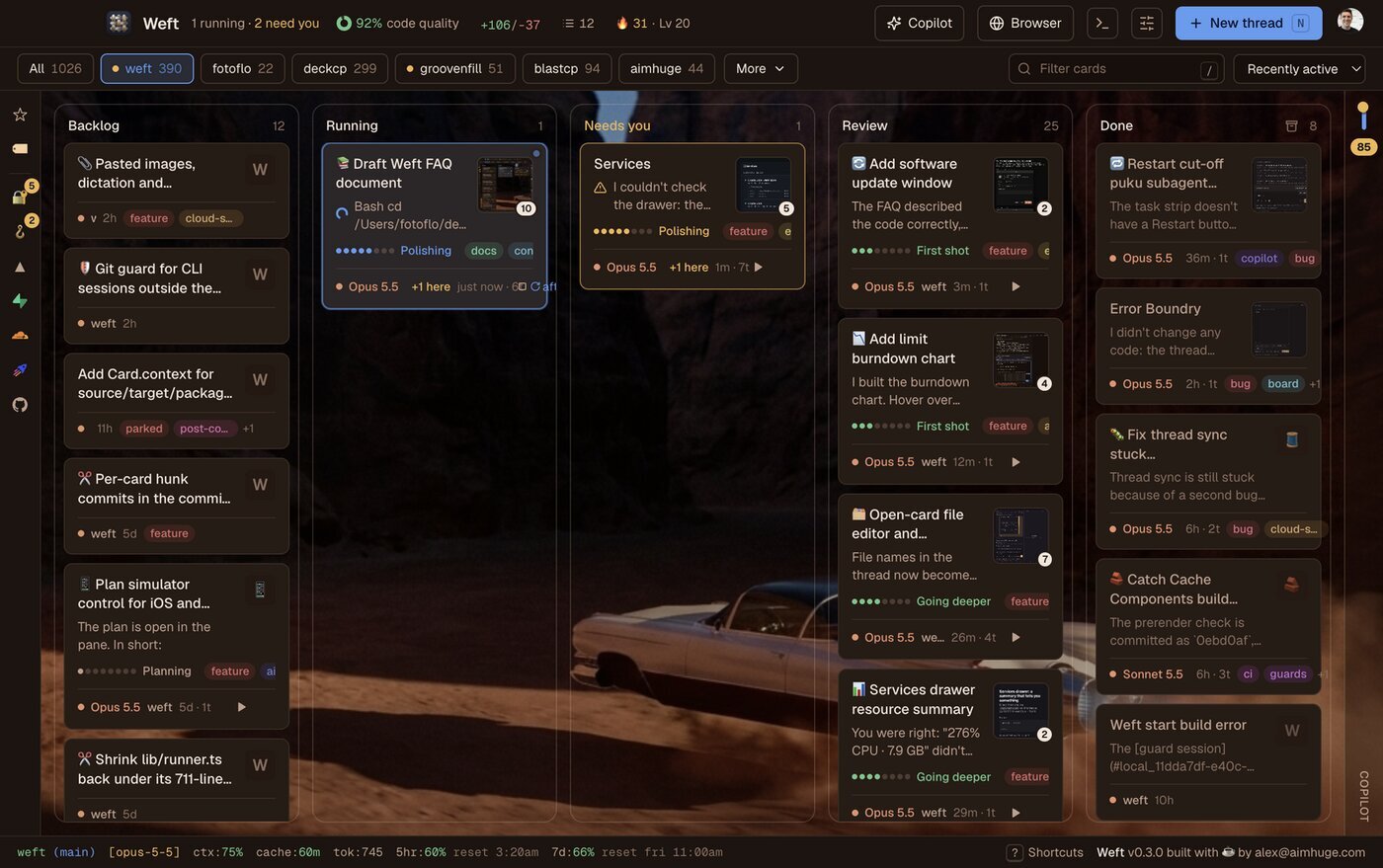
The board. Your cards in Backlog, Running, Needs you, Review and Done, with the project chips on top, the code-quality score, the uncommitted pile (+N/−N), your streak and, at the bottom, the plan limits.
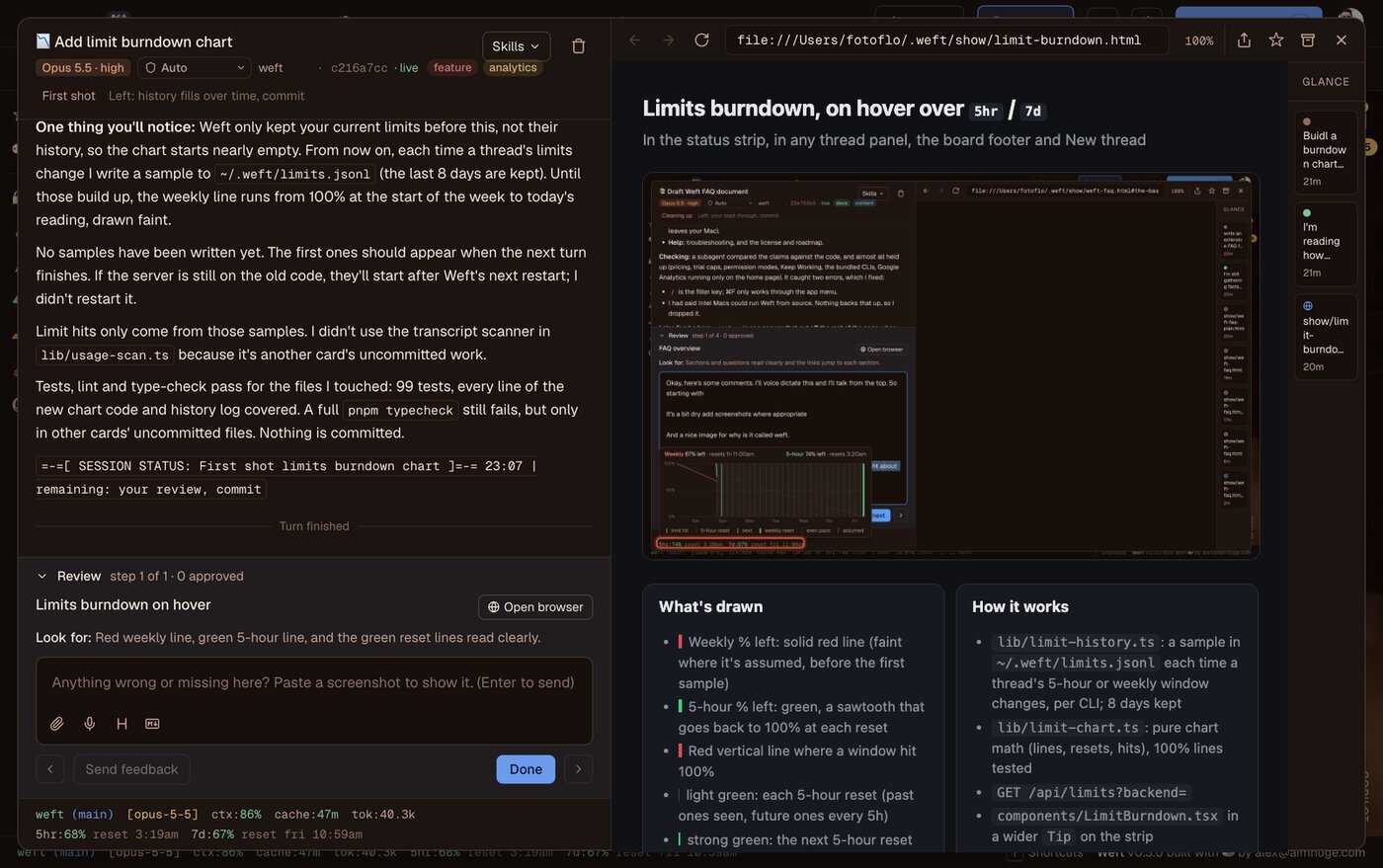
An open card. The thread on the left, the page its thread opened on the right (here a chart it drew), and the show rail of every turn and page beside it. A finished card hands you a review step to try and a Done button.
The copilot, code quality, connectors and your Wefter Profile.
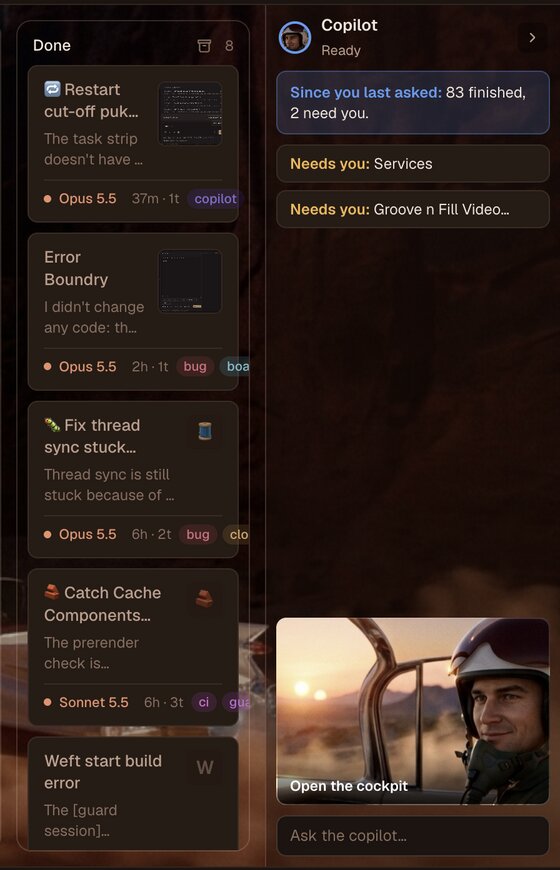
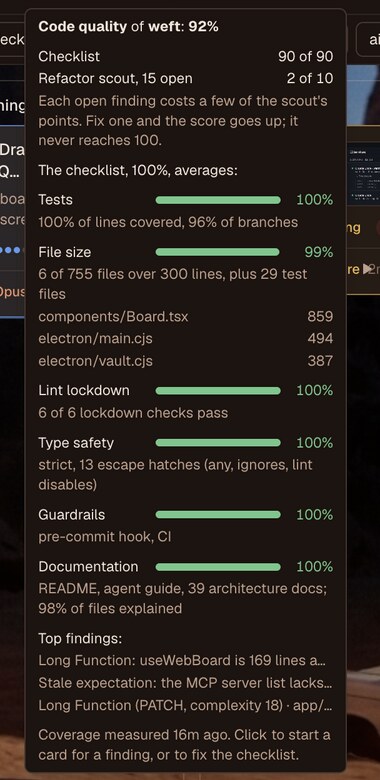
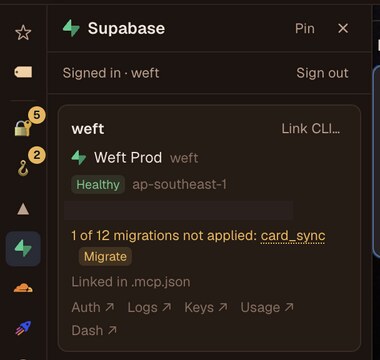
Left: the copilot lane tells you what finished and what's waiting on you. Middle: hover the quality badge for the checklist and the scout's top findings. Right: a connector drawer, here Supabase with its unapplied migration and a Migrate button.
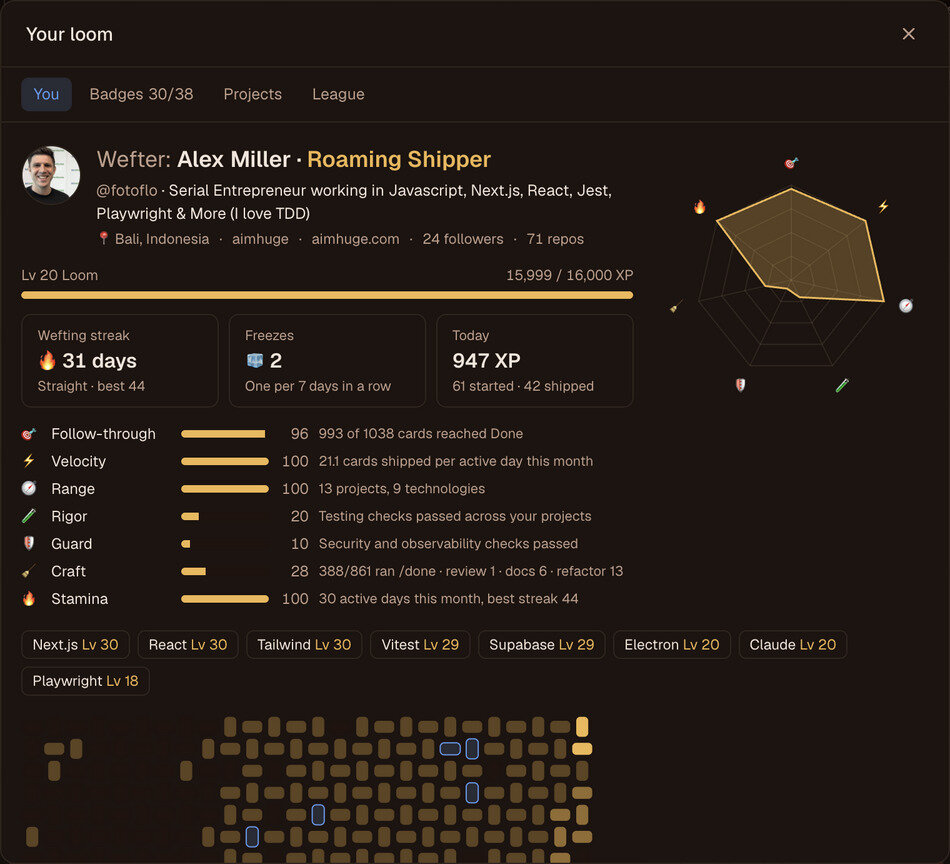
Your Wefter Profile is the progress dialog behind the 🔥 chip: your streak, what you're good at, the stack you ship in, and a woven cloth of your last 26 weeks.
Does it work on Windows or Linux?
Not yet. Weft is macOS only, and the release build is Apple Silicon (arm64) only. Windows and Linux builds are on the
roadmap. pnpm dev runs the board in a normal browser on any OS that runs the CLIs, but without the browser pane,
terminal drawer, vault or other desktop parts.
Installing and running
How do I get Weft?
Download the dmg from the button on weft.zip (it points at the latest GitHub release), or build from source:
git clone https://github.com/aimhuge/weft.git && cd weft
pnpm install
pnpm desktop
macOS says the app can't be opened. What do I do?
Signing and notarization are wired up but waiting on the Apple Developer certificate, so an unsigned build trips Gatekeeper. Right-click Weft.app → Open, then Open again in the dialog; macOS remembers that choice.
What do I need installed?
- At least one CLI, logged in:
claude(Claude Code),puku-cli, orcodex. The packaged app also bundles node, npm, pnpm, puku-cli and claude at the end of PATH, so a fresh Mac has something to run. - Optional: the
ghCLI (GitHub issues, repos, your profile card),whisper-cppandffmpegfor dictation (brew install whisper-cpp ffmpeg). - An Apple Silicon Mac: the release build is arm64 only.
Do I need a Claude subscription?
For Claude Code threads, yes: they run on your own Claude login and count against your plan's limits, the same as in
a terminal. puku-cli threads can run on the Puku trial with no Puku account (see
Pricing and billing). Codex threads use your own codex login.
Should I run pnpm desktop or pnpm dev?
pnpm desktop is the real app: board, browser pane, terminal, vault, tray, dock. pnpm dev is the board alone in a
normal browser at http://127.0.0.1:1024. Don't run both at once: Next.js allows one dev server per folder. The
~/Applications/Weft.app launcher opens Electron on your checkout, in dev mode. Build a packaged app (pnpm dist)
only to hand Weft to someone else; a local one goes stale with every commit.
How do updates work?
The packaged app checks GitHub Releases at launch and every few hours, downloads the new version in the background,
and offers Restart to Update in the Weft menu. If threads are running, it offers Restart When Idle (waits for
them) or Restart Now (cuts them off). Weft → Check for Updates… opens the Software Update window: your version,
the newest one, when it last checked, the release notes and the button for the next step. Unsigned builds offer the
download instead. Dev mode (pnpm desktop) never checks on its own; git pull updates it. What changed is in
CHANGELOG.md.
The first release, 0.4.0, is on GitHub Releases. It's signed but not notarized yet, so the first download from the web gets macOS's "can't be checked" warning: right-click Weft → Open. Updates after that install without it.
What happens when I close the window?
Weft keeps running, with your threads' CLIs open, so conversations stay alive and running turns keep going. ⌘Q quits. Opening Weft again brings the existing window back.
Can threads keep running with the lid shut?
Yes. Keep Working in the menu bar icon keeps the Mac awake with the lid closed, either Until threads finish
(sleep returns once nothing has run for two minutes, 8 hours at most) or for 1, 2, 3 or 8 hours. macOS asks for your
password once, to allow only pmset -a disablesleep 0|1. Sleep comes back at 10% battery, when you quit, and through a
watchdog if Weft crashes.
What are the main keyboard shortcuts?
⌘N new thread, ⌘J copilot, ⌃⌥Space copilot from any app, ⇧⌘B browser pane, ⌘K command palette, / (or ⌘F) filter
cards, ⌘, settings, ⌃` terminal, ⌘L tags, j/k move between cards, ⇧A archive, ⇧Z undo, Z reopen the last card. Press ? for the full,
searchable sheet. Hold ⌘ or Shift on the board and a card shows what that modifier does.
Cards and the board
What are the columns?
| Column | What it means |
|---|---|
| Backlog | Waiting to start (hidden until it has cards, or Settings → General → Show backlog) |
| Running | A turn is in progress |
| Needs you | The thread is waiting on a permission, a question or a decision |
| Review | The turn finished, failed or was stopped: look at it |
| Done | Finished; Done automations (by default /weft:done) run when you move it here |
How does a card know which column to go to?
Every thread ends its reply with a status line, BOARD STATUS: column=review | stage=First shot | remaining=add a test.
Weft strips that line from the message, moves the card and shows the stage and what's left on it. A permission
prompt moves it to Needs you on its own.
What are the eight dots on a card?
The stage: Planning, Pre-build refactoring, First shot, Going deeper, Polishing, Post-build refactoring, Cleaning up, Done. They show how far along the thread thinks it is.
What does the footer on a card mean?
● weft 12m · 1t · $1.22: the CLI (orange dot for Claude Code, purple for puku), the folder, how long it's run, the
number of turns and the cost so far. ⑂3 means three subagents or background commands are running.
How do I start a thread?
⌘N, double-click empty board, or right-click a column. Pick a folder (recent projects, git repos in ~/dev, your
GitHub repos, which are cloned if they aren't on this Mac, or New project…), write the prompt and press ⌘↵ to
start and close the dialog, or ⌃↵ to start and keep it open for the next one.
Who names the cards?
The first line of your prompt, at first. If that title says nothing ("Image attachment", "Untitled thread"), Haiku renames it after the first turn, with an emoji. A title you typed or edited is never replaced. Click the title in an open thread to rename it.
Can I put cards in the Backlog to start later?
Yes: Add to backlog in the New thread dialog. Drag a card to Running, or press Start now, to begin. The ☰ N counter in the header can plan your Backlog into sprints (see Code quality, committing and planning).
What happens to running cards if Weft quits or crashes?
They carry on after the restart: the card goes back to Running and its thread hears that Weft restarted, so it checks what it already finished and picks up from there (up to three times in a row). Anything that can't carry on stays in Review as "Stopped when the app closed", and ▶ Resume N at the top of Review restarts them all at once.
The model stopped too early. How do I nudge it?
The ▶ in the card's footer sends "continue" into the thread. A stopped or failed card also has Restart, which runs your last message again in a fresh CLI.
How do I archive cards?
⇧A archives the focused card (or the open thread) and steps to the next. ⇧E archives every Done card on screen. ⇧Z or the toast's Undo brings the last one back. Right-click Done for show/hide archived.
What's the difference between a star and a tag?
★ marks a card worth keeping: it's never auto-archived, and ★ on the left rail filters to starred cards. Tags sort cards by topic. They follow GitHub's label rules (lowercase, up to 50 characters, up to 8 per card) so they line up with issue labels. Weft tags untagged cards for you after a turn; tags you set yourself are never changed. Manage them in the 🏷 drawer (⌘L).
Does Weft show my existing Claude Code sessions?
Yes. On first launch Weft asks first: a welcome shows the profile your sessions make and the projects they're in, and
you pick which come in (or Start fresh). After that, on launch and every minute, Weft picks up the sessions
claude --resume lists, read-only from ~/.claude/projects, as cards. Replying continues the same session; if it's open in another app or changed in the last 10 minutes, Weft
continues it as a copy so two apps never write to one session. Deleting a picked-up card hides that session for good.
puku-cli sessions aren't picked up yet.
Do Weft's threads show up in the Claude app?
No. Weft's own threads are marked as SDK sessions, so they stay out of the Claude app's list.
Can I open a card from Raycast, Alfred or Shortcuts?
Yes, with links: weft://new?prompt=…&folder=…&start=1 makes a card, weft://card/<id> opens one, weft://copilot
opens the copilot.
Can I change how the board looks?


Yes. Settings → General (or ⌘K "Theme: …") picks System, Light or Dark, or a scene: Twin Suns, Canyon, Coast Road, Neon City, Snow Pass or Salt Flats puts that picture behind the board, with a palette drawn from it and clear columns. The first launch opens on Twin Suns, or Salt Flats when your Mac is in light mode.
CLIs, models and permissions
What's the difference between Claude Code, puku-cli and Codex threads?
- Claude Code is the default and the most complete: everything in Weft works with it, including rewind (↑ to edit your last message), YOLO mode and every guardrail.
- puku-cli is a Claude Code–compatible CLI on the Puku gateway, with its own models (Opus 4.8, Puku AI 2.8 and 2.7). It gets the same tools and guards, but can't rewind and has no YOLO mode. Weft keeps fewer puku CLIs warm (two idle at most) since each is a whole Node process.
- Codex runs the OpenAI Codex CLI, one process per turn, resuming its saved session. It gets Weft's browser,
board, secrets and webhook tools over HTTP, and the folder's
CLAUDE.mdand skills, but not the per-tool.env, git, restart and check guards. Its sandbox mode and reasoning effort are fixed when the session starts.
Can I switch a card's CLI or model later?
The model and effort can change any time, even mid-turn, from the open thread's header or the card's right-click menu. New threads start on the CLI, model and effort in Settings → Models, and the dialog remembers your last pick.
What are the permission modes?
| Mode | What it does |
|---|---|
| YOLO | Runs every tool without asking (Claude Code only) |
| Auto | A classifier approves safe calls and blocks risky ones (the default). A blocked call lands the card in Needs you with the classifier's reason: Allow once and retry lets that exact call through once, Keep denied leaves it |
| Accept edits | Edits files freely, asks before commands |
| Ask me | Asks before each tool |
Codex has its own set: Full access, Auto review, Workspace write and Read only. Change the mode per thread from the menu next to the CLI switch, the thread header or the card menu. Weft's guardrails apply in every mode.
Why do replies start so fast?
A full Claude Code setup takes 12 to 50 seconds to start. Weft keeps each thread's CLI open between turns (until you quit, by default), and starts spare CLIs before you need them: one for the copilot and one in your latest project at launch, and another whenever you pick a project, open New thread or open a card. A new card takes over the spare in its folder. A reply starts in about two seconds.
What does "Let the model choose" mean for subagents?
Threads are told to hand broad searches, independent pieces and test runs to subagents, to keep their own context small. Settings → Models → Use for subagents picks their model: let the thread choose per task (Haiku for lookups, Sonnet for most coding, Opus for hard reasoning), use the thread's own model, or force any Claude or Puku model. The strip above the reply box shows each subagent's progress, with a ■ Stop per task.
A thread says its CLI isn't logged in. Now what?
Weft runs <cli> auth login for you and pops up a login window with the link, the CLI's output and a box to paste the
code (or opens Terminal when the CLI needs a real one). Once you're logged in, the thread runs again. Settings →
Accounts shows each CLI's login status.
Working in a thread
What can the reply box do?
- Markdown, formatted as you type (the Markdown button shows the raw text the agent gets).
- Paste or drop images and videos where you want them; images reach the agent as image blocks at that spot.
- Dictate with the mic (whisper.cpp, on this Mac).
- The send button names what Enter does (Send, Queue, Answer, Run, Replace, New card), and its ▾ holds the rest.
- Send later (⌥↵, or the ▾ menu): hold a reply until the 5-hour limit resets, the weekly reset, an hour from now, tomorrow morning or any time. Weft sends it even with the thread closed.
- ↑ in an empty box edits your last message: the turn rewinds to before it and your new text goes out.
!commandruns a shell command in the card's folder right away, even mid-turn; its output goes to the thread with your next message.- Tab fills in the CLI's suggested next message (it never sends on its own).
- Drafts are kept per card until you send.
Can I read and edit the files a thread is changing?
Yes. An open card has four columns: thread, editor, browser pane and show rail. Each one closes (a thin strip reopens it, ⌥⌘1–4) and resizes by dragging. Click a file path in the thread to open it in the editor: CodeMirror for code, a rich editor for Markdown, and a Changes view against git HEAD where you can revert one chunk at a time. ⌘S saves and ⌘P opens a file. The file reloads live while the thread edits it, and if you both changed it you get a conflict banner, not a silent overwrite. Edit and Write rows in the thread show their diff.
What does cache:52m in the status strip mean?
How long the thread's prompt cache stays warm. Replies inside that window reread the thread at about a tenth of the
price. Once it reads cache:cold 120k, your next message resends the whole thread at full price, which eats more of
your 5-hour limit. For a new topic, a fresh card is cheaper.
How do I answer a thread's question?
When a thread asks with AskUserQuestion, the question appears above the reply box the way Claude Code shows it: numbered options (↑/↓, a number or Enter), checkboxes for multi-select, a tab per question and a Submit tab. Type in the reply box to give your own answer or add a note to your pick. An option's preview opens in the browser pane as you highlight it.
What are skills, and which ones come with Weft?
Skills are packaged instructions a thread can run with /name. Weft ships its own as a plugin, /weft:<name>:
/weft:donewraps a thread up: docs, lint, tests, a commit of the files it changed, and a push./weft:commitcommits the thread's changes with a conventional message./weft:previewstarts the dev server and checks the app really renders./weft:setup-doneinstalls what/weft:doneneeds on a new project: tests with coverage, docs, strict lint.
Each card's Skills button lists Weft's, yours (~/.claude/skills) and the project's.
What are automations?
Rules in Settings → Automations of the form "When … run …": when a thread starts, when you move a card to Review or
Done, or when your message matches a pattern (say vercel|deploy). A new install has one: moving a card to Done runs
/weft:done. Only your own moves trigger them, so a thread can't set off its own wrap-up.
Does /weft:done force-push?
Never. It's a plain git push (with -u origin for a branch's first push). A rejected push leaves the commit local and
the card in Review. Turn pushing off with Push on Done in Settings → Automations.
Who shows as the author of a thread's commits?
You. Commits are co-authored by "Claude Opus 5.5 on Weft" (whichever model the card runs), and PRs say "Generated with Claude Code on Weft".
The browser pane
What is the browser pane for?
It's a real Chromium browser beside the board, one page per card, that both you and the card's thread can use. A
thread can open URLs, read the page, take screenshots, click and type (mcp__browser__* tools), so it shows you the
running app, a dashboard or a page it wrote, rather than describing it. You're logged in to your own sites there, so a
thread can walk through a dashboard with you.
Why is there always a page in the pane, even for a quick answer?
On purpose: Weft is always showing you something. Every turn leaves something current in the pane: the app, a web page, or an HTML page the thread writes (a plan, a diff, test results, an answer). If a turn shows nothing, Weft opens a short update page Haiku writes for it (how it's going, what was done, what's next). Long tasks open their plan as a checklist first and tick steps off as they go.
What's the strip of little pictures on the right of the pane?
The show rail: one mini per turn of the open thread and per page the pane showed, newest at the bottom like the chat. Click one and the chat scrolls to that turn while the pane goes back to what it showed then. It hides in windows under 980px.
What's a review tour?
When a thread finishes work for you to check, it hands over a short tour: one step per change, each with a page to open and one sentence on what to look at. The review panel walks you through them in the pane, and you can send feedback on each step. Weft starts the project's dev server for the tour if it isn't running.
Can a thread see Weft's own window?
Yes, through mcp__board_view__*: it can screenshot, click, hover, type into and read the board window, so a thread
changing a Weft drawer or dialog tests it in the real app. Revealed secrets read as ‹secret› and are blanked in its
screenshots, and secret reveal and copy buttons can't be clicked.
A page in the pane won't load. Why?
Weft shows why instead of a blank page: the URL, the reason, Try again and Back to the last page. A local dev server that comes back reloads the page on its own. Restart the card's dev server from its right-click menu or the 🖥 Services drawer.
Running many threads at once
Why doesn't Weft give each card its own git worktree?
Speed and tidiness. A worktree per card means a fresh checkout, npm install and env setup each time, and stray
folders left behind. Weft keeps every card in your real folder and makes sharing it safe instead: warnings when cards
share a folder, and a prompt when two of them reach for the same code.
How does Weft stop two cards from clobbering each other?
- A busy card shows +1 here when another card is running or waiting in the same folder, and the New thread dialog says "Also running here: <title>".
- Symbol claims. Each card claims the top-level functions, components, classes and types its thread edits. When another busy card goes to edit a claimed symbol, it stops on a prompt: "Card ‘Fix login’ is editing LoginForm in Login.tsx. Wait, or go ahead?" Wait holds it until the other card lets go. Claims drop when a card reaches Done, is archived, or its files are committed through the commit walk-through.
Two cards edited the same files and now my tree is a mix. How do I untangle it?
Click the +N/−N counter in the header, or Review all at the top of Review. It starts a card that walks you through the uncommitted pile one Review card at a time, flagging files several cards share, and commits each card's own files by path (see Code quality, committing and planning).
How many threads can I run at once?
As many as your plan's limits and your Mac allow. The 🖥 Services drawer shows each thread's CLI with its CPU and memory so you can see what they cost. A good habit is a few cards in one repo touching different files, which is exactly how the sprint planner groups Backlog cards.
Guardrails: what threads can't do
What guardrails does Weft add?
On every Claude Code and puku-cli thread (and its subagents):
- No
.envreads. Threads can't read.env*files, the vault or the device key, and keys are dropped from the environment they inherit from your shell. - No killing Weft. A
kill,pkill, port-freeing or secondpnpm devaimed at Weft is refused while other cards are running, with how many turns it would cut off. The thread's own project dev server is fair game. - No destructive git in the shared tree: no
git stash,reset --hard, path checkout/restore orclean -f, since other cards' unsaved work lives there too. - One type-check at a time.
tscandeslintrun directly are refused where a project'spnpm typecheckandpnpm linttake turns across cards. - Asks before leaving the project. A file tool or command that reaches another folder (say
~/Downloads) stops at Allow once, This card or Always. - Broken imports caught at the edit. After every edit, the thread is told which imports it broke or dropped, before you'd see a build error.
- Symbol claims between busy cards in one folder (above).
Do the guardrails apply to Codex and Goose?
Yes, the same ones. Every tool call a Codex or Goose thread makes goes through Weft's guards before it runs, through each CLI's own hooks: the secret guard, the folder gate, the git, restart and check guards, broken-import warnings and symbol claims all see it, and refuse or ask in the same words as on Claude Code. If Weft can't install its guards for a turn, the turn doesn't start, and the card says why. One thing stays Claude Code and puku-cli only: an MCP server's own mid-call form.
What if Weft really does need a restart?
Use Restart When Idle (Weft menu, ⌘K, or a thread calling mcp__board__restart_weft_when_idle with your OK).
Nothing new starts, messages you send wait on their cards marked "after restart", and Weft relaunches once the last
running turn ends. The header shows ⟳ Restart after N; click it to cancel.
The secrets vault
What is the 🔐 vault?
A store for each project's API keys and secrets, kept per GitHub repo so clones of one repo share it. Values are encrypted on disk and only decrypted inside Weft's Electron main process. You see names by Development, Preview and Production, with only the last four characters showing.
Can a thread see my secrets?
No. Threads only ever get names. They use values three ways, each behind Touch ID, without the value entering their context:
- Fill a field.
mcp__secrets__fill_fieldtypes a value into a field in the browser pane (https only); it reads back to the thread as‹NAME›. One yes covers that card on that site for 3 minutes. - Run a command.
mcp__secrets__run("pnpm run migrate", ["DATABASE_URL"])shows you the exact command, itspackage.jsonscript and the names, then runs it with no shell and the values in its env only. The output comes back with every value masked. Pipes, redirects,$VAR,node -e,printenvandcurlare refused. - Push to Vercel.
mcp__secrets__push_to_vercelsends a value to the linked Vercel project.
A card's dev server also gets the development values, with its log redacted.
What's a "blank"?
A secret name with no value yet. When a thread needs a key you haven't added, it adds the name as a blank with a hint for where to get it, and carries on with whatever doesn't need it. 🔐 counts the blanks; each blank row has a Fill in button. When a thread is blocked on a key right now, it shows an input for it right in the thread instead.
What if I paste a key into a thread by accident?
It's in the transcript and was sent to the model. Rotate it at the provider and put the new one in the vault. The reply box flags a pasted key shape before you send, and the pre-commit hook scans staged lines for keys.
Can I bring in my existing .env files?
Yes. Import… reads the project's .env files inside Electron main (never in a thread) and previews each name as
new, same, differs or missing before writing anything. .env.example brings names only. Tick "Then let Weft write
.env.local from the vault" and Weft keeps that file in sync with the vault, so next dev and your scripts keep
working.
How is it encrypted?
XChaCha20-Poly1305 under a per-vault key, sealed to this Mac's X25519 key, whose private half lives in the Keychain
via Electron's safeStorage. Files are in ~/.weft/vault/. Reveal and copy need Touch ID; values hide again after 3
idle minutes, and a copied value leaves the clipboard after a minute. Details in
secrets.md.
Connectors: GitHub, Vercel, Supabase, Cloudflare, BlastCP
Which services does Weft connect to?
Each has a drawer on the left rail that links a board project to its counterpart:
| Drawer | What it does |
|---|---|
| GitHub | Shows the gh sign-in and each project's repo; turns open issues into Backlog cards |
| ▲ Vercel | Links or creates a project, shows the latest deploy, pushes vault secrets as env vars |
| Supabase | Links or creates a project, shows unapplied migrations, applies them on your OK |
| Cloudflare | Links a Worker or Pages project, shows deploys |
| BlastCP | Shows what a project has queued to post on BlastCP |
Tokens are kept in your Keychain and threads never see them. Linking writes the same files the official CLIs do
(.vercel/project.json, supabase/.temp/project-ref), so the CLIs in any thread work on the right project.
How do GitHub issues become cards?
Turn on Issues → Backlog cards for a project in the GitHub drawer. Its open issues become Backlog cards with the
issue's body, a link, and labels as tags; Weft checks every 5 minutes (or within seconds with Instant, by webhook,
if you're signed in and admin on the repo). A closed issue archives its card if the card never started. It's one
direction: Weft never edits issues, and never holds a GitHub token (gh keeps its own).
Will a thread apply my Supabase migrations without asking?
A thread that writes a migration applies it itself in the same turn, after reading the live schema. It asks first, with buttons, when the migration drops or rewrites data. For migrations already in the folder, Migrate in the Supabase drawer starts a card that reviews and applies them on your OK.
Does Weft deploy for me?
It doesn't run deploys itself. A Vercel project linked to the folder's GitHub repo deploys on every push (and
/weft:done pushes), and the drawer shows the latest deploy's status with links to its logs.
Dev servers, services, webhooks and the terminal
Why do threads start dev servers through Weft instead of in the background?
A server a thread starts with mcp__devservers__start belongs to Weft: it keeps running after the thread's CLI closes,
doesn't hold the CLI open, shows in the 🖥 Services drawer with its URL, Restart and Stop, and gets the vault's
development values.
What's the 🖥 Services drawer?
Everything Weft spawned: each thread's CLI (named by its card) with whatever it started, each dev server, each terminal shell, with CPU and memory and a total. End stops a service; ✕ ends one process. Pick a refresh rate from 1 to 30 seconds, or pause it.
How do webhooks reach a dev server on my Mac?
The 🪝 drawer lists each project's webhook routes. A thread that writes a route a provider posts to (Stripe, GitHub, Resend) records it there, and Weft can give it a public relay URL on weft.zip that forwards deliveries to your local route while Weft runs. No ngrok needed. The relay needs a Weft account.
Is there a terminal?
Yes: ⌃` (or t on the board) opens a real login shell in a drawer along the bottom. Each folder gets its own shell,
following the open card or selected project, and you can split up to three side by side. Use it for anything long-running or
interactive that a thread shouldn't run.
The copilot
What is the copilot?
Your wingman: a thread that runs the board instead of a project. It can list cards, read threads, create and start cards, reply to them, move and stop them, and answer their permission requests. Reading and rearranging happen without asking; starting a thread, replying to one or answering for one asks you first.
Where is it?
A lane on the right of the board with three states: hidden (a small pill), peek (a 236px digest of what finished and what's waiting on you) and open (a 520px chat). ⌘J cycles them. ⌃⌥Space opens a separate copilot window from any app, even with the board hidden.
Does the copilot act on its own when a thread finishes?
No. It learns what finished, needs you or failed only when you next message it. Nothing runs a copilot turn by itself.
What are personas?

Who the copilot is, picked from its name in the lane header:
- Wingman (default) runs the board.
- Founder tests the business before you build: competitors, buyers, pricing, unit economics, one thread per step (after founder-skill).
- Captain runs the work as a sprint: office hours, reviews, build, QA, ship, retro (after gstack).
Switching starts a new chat.
Where do the suggestion chips in an empty copilot chat come from?
Haiku writes up to four from what Weft knows about your work, most urgent first: open cards and their questions,
errors, limits, the uncommitted pile, code quality, vault blanks, the latest deploy, unapplied migrations, open PRs and
issues. They refresh after a card moves. GET /api/copilot/suggestions?context=1 shows exactly what it read.
Code quality, committing and planning
What's the "87% code quality" badge?
A score for the project in view. A checklist earns 90 points (test coverage, file size, lint, types, guardrails like a pre-commit hook and CI, docs). A refactor scout, a read-only Sonnet run, earns the last 10 by finding concrete smells (Long Function, Duplicated Code…) with a file, line and one-line fix. It's capped at 99, because there's always another refactor. Click it to start a card on the checklist, or one small card per finding.
Does the scout run all the time?
No. It runs on its own once for a project with no report. After that /weft:done scouts the files a session touched,
and Re-scout now reads the whole project again. It never runs on the start-a-card path.
What's the "+1262/−832" counter?
Every uncommitted line in the project's repo. Click it (or Review all) to start a card that walks you through committing the pile one Review card at a time, on a checklist page written for non-engineers: what each change does, how to try it, and a review bar with Commit, Commit and push, Commit and run /done, Skip, or a box to ask for changes. Commit buttons run without an LLM turn; only a failure goes back to the thread.
What's the "☰ 7" counter?
The cards waiting in Backlog. Click it for a read-only planner that sizes each card (S/M/L), flags duplicates, finished cards and vague ones, and groups the rest into sprints of 3 or 4 that touch different files, so a sprint's cards can run side by side in one folder. It starts nothing until you say so.
Streaks, badges and leagues
What's the 🔥 chip?
Your streak and level. Starting a card earns 2 XP, a turn 1, a card taken to Done 10 (15 when the project's checklist scores 80+). Shipping pays more than starting. Every 7-day run earns a streak freeze (up to 2). Turn it off with Settings → General → Show progress.
What's in your Wefter Profile?
Your wefter card (with your GitHub profile when gh is signed in) and seven attributes worked out from what you build,
whose top two name your class ("Roaming Shipper"); stack skills by technology; 26 weeks of activity as woven stitches;
38 badges; a production-ready tree per project (Testing, Security, Observability, Docs, Delivery) where every missing
check has Set it up; and, signed in, your weekly league.
What do leagues share about me?
Only your name and your week's numbers: XP, cards shipped, streak, level and the badges you earned. Never prompts, code or project names. Leagues hold up to 30 builders, Cotton to Gold Thread; the top 7 move up each week and the bottom 5 move down.
Accounts, teams and weft.zip
Do I need a Weft account?
No. The board, threads, browser pane, vault and connectors all work signed out. An account (GitHub, Google or an email link) adds the cloud features: the Puku trial, web board and sync, share links, teams, leagues, webhook relays and instant GitHub and Vercel events.
What's a workspace?
Every account gets one. Your team in the account menu opens weft.zip/team: members, roles (owner, admin,
member), email invites. Billing and the shared vault hang off the workspace.
Can I see my board from my phone or another computer?
Yes, for projects you turn on in Settings → Sync. Their cards and threads upload to your workspace, and
weft.zip/<workspace>/board shows them live in the desktop's own columns and thread view. You can start a new thread,
reply, answer a permission or a question, and stop a turn from there; the Mac that owns the folder runs it, so it has
to be on with Weft running.
Is synced thread text encrypted?
Not yet. Turn sync on only for projects you're fine storing on Weft's servers. Sync is off by default and per folder.
How do I share a single thread?
Share… on a card's right-click menu (or the pane toolbar) makes a weft.zip/s/<id> link showing the thread and its
browser pane side by side, live. Make it private to your workspace, public, gated by email or by password. Key-shaped
text is masked and long tool outputs stay on your Mac. Sharing turns on sync for that folder.
What's on my public profile?
weft.zip/@username (your GitHub login): your picture, name, GitHub link, when you joined and threads you've shared
publicly. Never your email or workspace.
Pricing and billing
How much does Weft cost?
Every workspace has a plan:
- Free: the full app, plus the Puku trial's daily cap (150 requests and 1M tokens a day). A Free workspace is a team of one: it can't invite members.
- Pro: $20/month or $200/year per workspace (not per seat), replacing the daily cap with 300M Puku tokens per billing period, and letting you invite people into the workspace.
- Team: $9 per seat a month, on top of everything in Pro, for a shared workspace with roles and invites.
Every plan also comes with BlastCP usage: Free has BlastCP Free (1 brand, 3 channels, 30 posts a month and $0.50 of AI generation, once), and Pro and Team have BlastCP Creator (every channel, unlimited posts and $3 a month of AI generation). BlastCP doesn't apply those yet — they're what the plan buys, not what it enforces today.
Claude Code and Codex threads always run on your own plans with those providers; Weft doesn't charge for them.
Can I share a workspace with my team?
Yes, on Pro or Team. Invite people by email, give them an admin or member role, and share the workspace's board from any browser. Free is a workspace of one, so an invite from a Free workspace is refused with a note to upgrade. Team is priced per seat ($9/seat a month) if you'd rather pay for heads than a flat workspace rate.
What is the Puku trial?
A puku thread with no Puku login of its own, while you're signed in to Weft, runs through a proxy on weft.zip on Weft's own Puku key, with a daily cap per account. Weft's key never ships in the app; your Mac holds a day-long signed token.
How do I upgrade or manage billing?
Settings → Accounts shows your plan and meter; Manage billing opens the workspace's billing page on weft.zip (Stripe Checkout to upgrade, Stripe's portal to manage). Owners and admins manage billing.
Privacy and your data
Where does Weft keep my data?
In ~/.weft on your Mac: board.json (cards), threads/ (thread views), attachments/, activity.jsonl, the vault,
pages and settings. The CLIs keep their own transcripts as usual. Set WEFT_DATA to use another folder.
What leaves my Mac?
- Your prompts and code go to the model provider of each thread's CLI (Anthropic, Puku, OpenAI), as they would in a terminal.
- Small Haiku runs (card titles and tags, update pages, copilot chips) go through your own Claude login.
- With an account: your session, and league numbers if you're in one.
- Only if you turn it on per folder: synced cards, threads and pages for the web board and share links.
Does Weft track me?
On weft.zip (the home page, FAQ, profiles, share links and the web board), Google Analytics and PostHog, including PostHog's session replay, load only after you accept them in the banner; signed in, PostHog links your visits to your account. A Weft on your own Mac never loads either. The desktop app does send anonymous onboarding stats (which welcome steps you went through, never prompts, paths or card content), on by default: switch them off in Settings → Security. The bundled puku-cli has its telemetry removed. The details are in the privacy policy.
Can other websites or apps drive Weft?
No. Weft's local API only answers requests addressed to 127.0.0.1 or localhost, and writes need a special header, so a
web page can't drive it. The browser pane's control server needs a token kept in a file only you can read
(~/.weft/shell-token), never in an environment variable.
Troubleshooting
The board keeps reloading in development.
Stop the app, delete .next, and start again. A stale dev build cache causes it.
Part of the board says it "failed to draw".
A thread was probably partway through editing Weft. The rest of the board keeps working, and that piece draws itself again once the file is fixed (or click Try again). If the whole board fails, its page offers Try again and Reload window.
A bar at the top names a broken file.
That's a build error, a file that doesn't compile. The board keeps running the last version that built, and the bar goes away once the file is fixed. Dismiss it with ×.
Weft is stuck on "Starting the board…"
The start screen says why when the board doesn't load, with Retry, Logs and Quit. The server's log is in
~/Library/Logs/Weft/server.log (Help → Open Logs Folder).
Launch felt slow.
Every launch is timed phase by phase into ~/.weft/startup.jsonl, and Weft shows a toast naming the slowest phase when
one runs well over your usual. node electron/startup-timer.cjs lists recent launches.
Weft can't find claude or puku-cli.
Weft reads your login shell's PATH even when started from Finder. Check which claude in a new terminal; if it's
there, quit and reopen Weft. Settings → Accounts shows whether each CLI was found and is logged in.
A thread got "Operation not permitted" on Downloads, Documents or Desktop.
macOS protects those folders. The thread can call mcp__board__request_folder_access, which shows macOS's prompt or
sends you to System Settings → Privacy & Security → Files and Folders. Weft needs a restart after you allow it.
A thread is stuck waiting on something.
Look at the card: a permission prompt or a question shows right on it. If a subagent or background command is hanging, the strip above the reply box has a ■ Stop per task. ■ in the reply box stops the whole turn; Restart reruns your last message in a fresh CLI.
My first message on a new card is slow.
A card in a folder with no warm spare (or on a different CLI) waits for its CLI to start the first time. Opening the New thread dialog or picking the project a moment earlier starts one in the background.
Contributing, license and what's next
Is Weft open source?
Source-available under the Functional Source License 1.1, ALv2 Future License, with Weft Additional Terms. You can use it at work and build client work with it. You can fork and change it for personal use, non-commercial education and research, and to send changes back; a modified Weft used in or for a business, or built into a commercial project, needs a commercial license. No copy may switch off or get around Weft's plans, limits or payments, and you can't offer it, or something built mainly on it, as a competing product or service. Each release becomes Apache-2.0 two years after it ships; versions up to v0.3.0 are Apache-2.0 already. The Weft name and logo aren't covered: a fork you share needs its own (see TRADEMARKS.md).
Can I contribute?
Yes, and you keep your copyright; there's no CLA. Start with CONTRIBUTING.md. Security reports go to SECURITY.md. Weft is built mostly by its own threads, so a good first step is to open it on its own repo and start a card.
Does Weft improve itself?
It tries. Threads working in Weft are told to look for ways it could be better and may start a card to fix one. The code quality badge's scout and checklist turn refactors into a stream of small cards.
What's on the roadmap?
Signing and notarization, Windows and Linux builds, a single-instance lock, encrypted sync, a shared team vault, picking up puku-cli sessions, and more. See docs/ROADMAP.md.
What are the known gaps?
- The copilot doesn't act when a thread ends; it hears about it with your next message.
- puku-cli sessions aren't picked up from disk, and a full puku thread hasn't been verified end to end.
- Picked-up Claude Code cards show the last 400 items, as last read from disk, until you reply in Weft.
- Symbol claims drop on Done, archive or the commit walk-through, not when a thread runs
git commititself. - Synced thread text isn't encrypted yet.
- The release build is Apple Silicon only.